
Cart
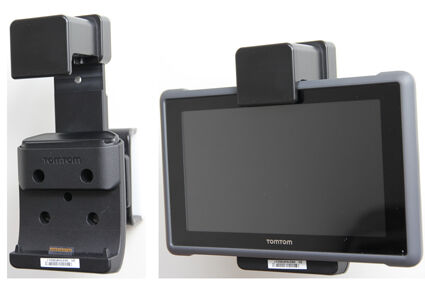
Key Lock Non-Charging Holder
Complete with Tilt Swivel
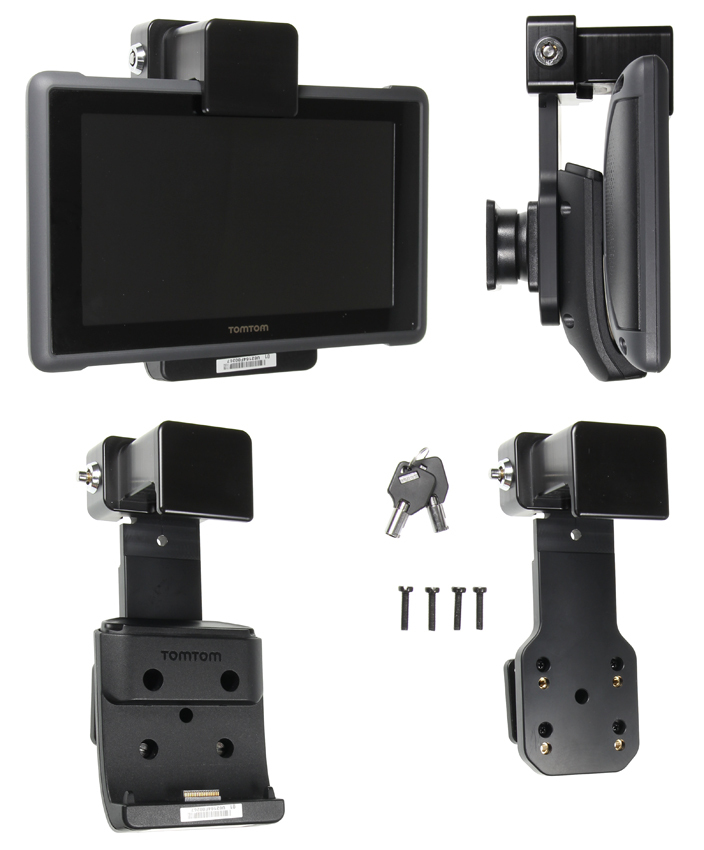
This GPS holder is made for the TomTom Bridge Pro 8275 TomTom Bridge. It is moulded to the shape of the device, so it docks and releases with one hand and stays firmly in place on rough roads.
It is a non-charging holder, so there is nothing to wire in. A tilt swivel turns the screen from portrait to landscape and angles it away from glare. A built-in key lock secures the device in the holder.
It is the holder on its own. It screws onto a ClicOn dash mount with the screws provided, so pick the mount made for your vehicle to complete the set-up.
Firm and secure fit
- Customised design to firmly fit your TOM TOM device.
Built-in spring key lock
- Built-in Key Lock supplied with two keys.
- The holder is suitable where security is essential.
AMPS pattern mount holes
- The holder's AMPS Pattern Mount Plate easily attaches to our pedestal mounts, bar mounts, or vehicle dash mounts.
- Firm & Secure Fit
- Key Lock
- AMPS Pattern Mount Holes
- Landscape to Portrait Viewing
| This Holder Fits | TomTom Bridge Pro 8275
TomTom Bridge
|
| SKU | 215778 |
| Barcode # | 7320282157784 |
| Brand | ClicOn |
| Shipping Weight | 0.2650kg |
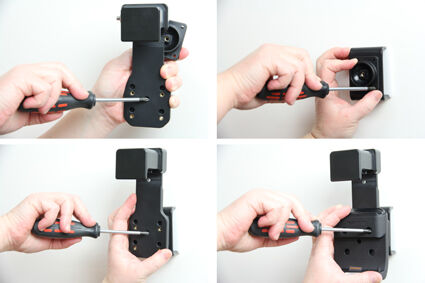
Below you will find the installation instructions for the Key Lock Non-Charging Holder (SKU:215778), you can click on the images to open a larger version in a new tab
Step 1
1. Loosen the screw in the centre of the holder so you can remove the tilt swivel attaching plate on the back. Place the attaching plate in the desired position. Screw the attaching plate into place with the enclosed screws. Place the holder over the attaching plate so the screw fits in the hole in the tilt swivel. Screw the holder onto the attached plate. Tighten the screw so the holder is firmly in place but still can be adjusted. Attach your TomTom dock to the holder using the enclosed screws.
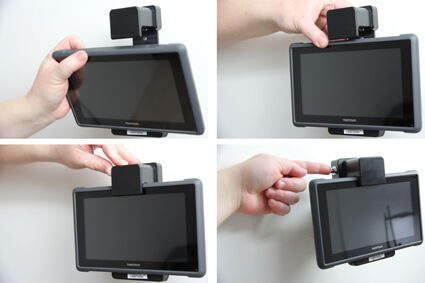
Step 2
2. To place the device in the holder: Place the lower part of the device in the dock, then flip/press the upper part forward so it snaps into place in the dock. Push the lock downwards and press the button on its side to lock the unit into the holder.
Step 3
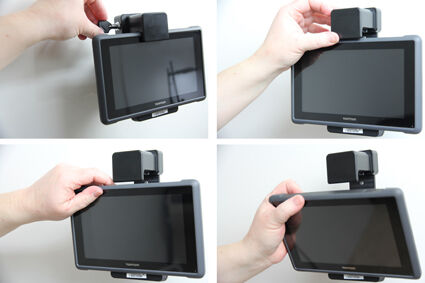
3. To remove the device from the holder, Use the enclosed key to open the lock. Slide the lock upwards. Release the device from the dock by pressing the button on the top side of the dock. At the same time, pull the upper part of the device out from the dock and then lift the device up and out from the holder.
Step 4
4. The holder is in place.
GPS holder for the TomTom Bridge Pro 8275 TomTom Bridge. Non-charging. 360-degree tilt swivel. AMPS pattern holes. Mount sold separately.
Our Price
$139.90

One Year Warranty

Free Shipping Over $110.00

30 Days Return Policy

Australian Owned & Operated